













Log your lifts on Apple Watch
Repsalot runs on your iPhone and your wrist. Plan on the phone, then start, log and rest on the watch.
The watch app is free and comes with the iPhone app.
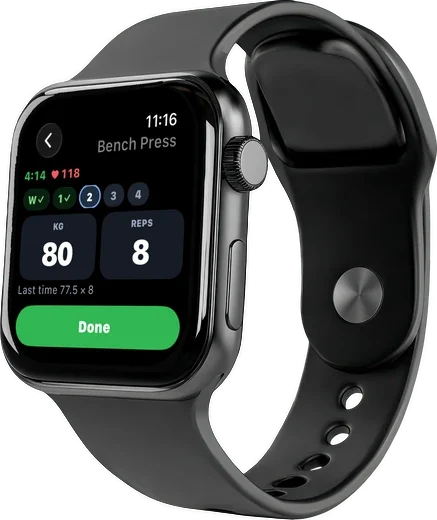
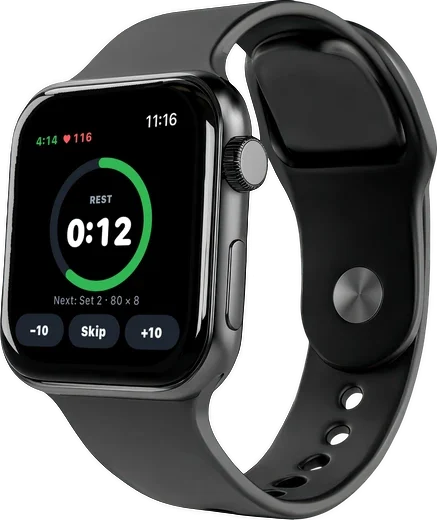
Each device does what it is best at
On your wrist
- Start today’s planned workout with one tap
- Log a set with one tap, weight and reps filled in
- Rest timer that starts by itself and buzzes, tap the time to pause
- Heart rate and calories, measured by Repsalot on the watch
- New PRs the moment you hit them
- Saved to Apple Health too, if you allow it
On your iPhone
- Build plans or take one from the community
- Your whole history, progress charts and monthly report
- Your workout on the lock screen while you train
- Food, steps and friends in the same app
How it works
Plan on your iPhone
Make a plan in Repsalot, or pick one from the community.
Start on Apple Watch
Open Repsalot on the watch and tap Start. It comes with the iPhone app.
Finish anywhere
The workout and its summary are saved to your log on the iPhone.
Questions
Which Apple Watch do I need?
Apple Watch Series 6, SE (2nd generation) or newer, with watchOS 11 or later, paired with an iPhone.
Is the watch app free?
Yes, like the iPhone app.
How do I get it on my watch?
With Automatic App Install on, it comes by itself with the iPhone app. If not, open the Watch app on your iPhone, go to My Watch › Available Apps and tap Install next to Repsalot.
Do I need my iPhone at the gym?
Not in your hand. The watch works together with Repsalot on your iPhone, which keeps your plans and your log. The iPhone can stay in your bag: if they lose touch, the watch keeps the workout and sends it over when they’re back together.
I have a Garmin, Fitbit or another watch
Repsalot doesn’t run on those watches, so you log the workout on your iPhone. In beta, heart rate and calories still come after the workout when the watch’s app saves them to Apple Health. Start the workout on the watch too. What a watch shares is up to its maker: Garmin gives Apple Health only the highest and lowest heart rate, and Fitbit doesn’t share with Apple Health.
Who sees my heart rate?
Only you. Heart rate and calories are never shown to others unless you turn them on for a workout post yourself.