













The gym tracker for your Wear OS watch
Start today’s workout, log every set and rest between them right on your wrist. Your phone can stay in your bag.
Free, together with the Repsalot app for Android phones.
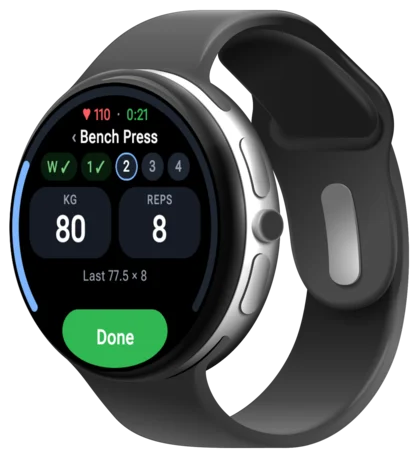
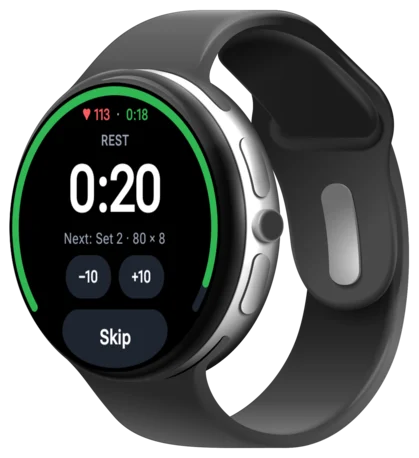
What you can do on the watch
Start today’s plan
The workout you planned for today is one tap away, with its exercises and how many you have done this week.
Log every set
One tap saves the set, with the weight and reps already filled in. No phone in your hand between sets.
Rest on your wrist
The rest timer starts by itself after each set and buzzes when rest is over. Need a break? Tap the time to pause the workout.
Heart rate and calories
Repsalot measures them on the watch while you train and saves them with the workout, exercise by exercise. Only you see them.
New records on the spot
Beat your best and the watch shows the new PR the moment you finish the set.
Everything in your log
Finish on the watch, see the summary, and the workout is saved in Repsalot on your phone.
Set it up in 2 minutes
Wear OS doesn’t install watch apps by itself, so Repsalot on your phone does it with one button. Do it once and the watch finds your phone every time after.
Before you start
- An Android phone with Repsalot, signed in
- A watch with Wear OS 3 or newer, for example Galaxy Watch4 and later or Pixel Watch
- The watch paired with this phone in its own app (Galaxy Wearable, Pixel Watch or Wear OS)
- The same Google account on the phone and in the watch’s Play Store
Install Repsalot on the watch
Two ways, the same result. Pick one.
From your phoneEasiest- In Repsalot: Settings › Connections › Smartwatch.If it asks which watch you wear, pick Wear OS smartwatch.
- Tap Install on watch.Google Play opens on your watch.
- Tap Install on the watch.It takes about a minute over Wi-Fi.
orOn the watch- Open Play Store on the watch.Swipe up from the watch face and tap Play Store.
- Scroll to “Apps on your phone”.Watch apps of apps you already have on the phone are listed there.
- Tap Repsalot, then Install.The same app, the same result.
Connect
- Open Repsalot on the phone once.Your plan and settings travel from there.
- Open Repsalot on the watch.There is nothing to sign in to. After a few seconds it shows today’s workout.
- Tap Start.The workout runs on both and saves to your log on the phone.
Heart rate and caloriesOptional
- Allow them on the watch.Repsalot asks the first time you open it. No Health Connect needed: the watch sends them to your phone when you save the workout.
- Change it any time.On the watch, Settings › Permissions lists Heart rate, Calories and On the watch face, each with ✓ or Allow.
- Wear the watch snugly.A finger above the wrist bone, so it can read your pulse.
Something not working?
- Play doesn’t openInstall on watch did nothing, or Repsalot isn’t under “Apps on your phone”? Check that the watch is on, paired with this phone and uses the same Google account, then update Play Store on the watch and Repsalot on the phone.
- No workoutThe watch opens but shows no plan? Open Repsalot on the phone, keep Bluetooth on and the phone near you, then reopen the watch app.
- No heart rateOpen Repsalot on the watch during the workout; it keeps measuring with the screen off. If Heart rate is on in Repsalot on your phone but off on the watch, Settings › Smartwatch shows Allow on watch.
- Still stuckWrite to support@repsalot.com with your watch model.
Questions
Which watches does it work on?
Watches with Wear OS 3 or newer paired with an Android phone, for example Samsung Galaxy Watch4 and later or Google Pixel Watch.
Is the watch app free?
Yes. The watch app is free, like the phone app.
Do I need my phone with me?
Not in your hand. The watch works together with Repsalot on your phone, which keeps your plans and your log. The phone can stay in your bag: if they lose touch, the watch keeps the workout and sends it over when they’re back together.
Does it work with an iPhone?
No. Wear OS watches pair only with Android phones. For iPhone there is the Apple Watch app.
I have a Garmin, Fitbit or another watch
Repsalot doesn’t run on those watches, so you log the workout on your phone. In beta, heart rate and calories still come after the workout when the watch’s app saves them to Health Connect. Start the workout on the watch too. What a watch shares is up to its maker.
Who sees my heart rate?
Only you. Heart rate and calories are never shown to others unless you turn them on for a workout post yourself.
When can I get it?
Together with the Repsalot app for Android, coming soon on Google Play.